
BFCM 2026 Preparation Guide: How to Prepare Your Shopify Store for Black Friday Cyber Monday

A week-by-week Shopify checklist for BFCM 2026, covering variants, discounts, checkout testing, inventory, AI channels, and post-sale analysis, so your store is ready before the traffic hits.
Key Takeaways
- The BFCM 2026 preparation guide in short: start in early October, finish inventory orders and development before November, and spend the final two weeks testing.
- Test the real purchase journey on a phone: collection page, variant selection, cart, discount, checkout, and confirmation email.
- Audit variants early. Unclear swatches, missing variant images, and hidden sold-out sizes slow shoppers who are comparing several stores at once.
- Keep offers explainable in one sentence, and test every discount combination in a real cart before launch.
- Check stock by variant, not by product. A product can look available while its best-selling size or color is gone.
- Freeze theme, app, and pricing changes during BFCM week, so any problem that appears is easier to trace and fix.
- New for 2026: Shopify Scripts stopped running June 30, and agentic storefronts can list eligible products in AI channels like ChatGPT and Copilot.
At the peak of Black Friday 2025, Shopify merchants were collectively selling $5.1 million per minute. The weekend closed at a record $14.6 billion, up 27% from 2024, and more than 94,900 merchants had their best sales day ever, according to Shopify's BFCM 2025 results.
Inside a single store, BFCM feels less like a headline and more like pressure. Traffic arrives in waves. Shoppers open five tabs and compare you with competitors. Your best-selling size sells out mid-morning, a discount code fails at lunch, and the support inbox fills before you've checked the numbers.
This BFCM 2026 preparation guide covers the work that has to happen before that point. Once the sale is live, you can only react. The things that change results (product pages, variants, stock, checkout, campaigns) need weeks of lead time.
The guide follows the path every order takes through your Shopify store:
Traffic → Product discovery → Product evaluation → Variant selection → Cart → Checkout → Purchase → Retention
For each stage, you'll find what to check, why it matters during BFCM, and what to do about it.
When is BFCM 2026?
What's Different About BFCM 2026 on Shopify?
The selling season is longer, Shopify's product and checkout platform changed during 2026, and more shoppers now find products through AI assistants. Each change affects how you prepare.
For Shopify holiday sales preparation, the practical takeaway is simple: start earlier, re-test anything these platform changes touched, and make your product data clear enough for both shoppers and AI systems.
BFCM 2026 Preparation Timeline for Shopify Stores
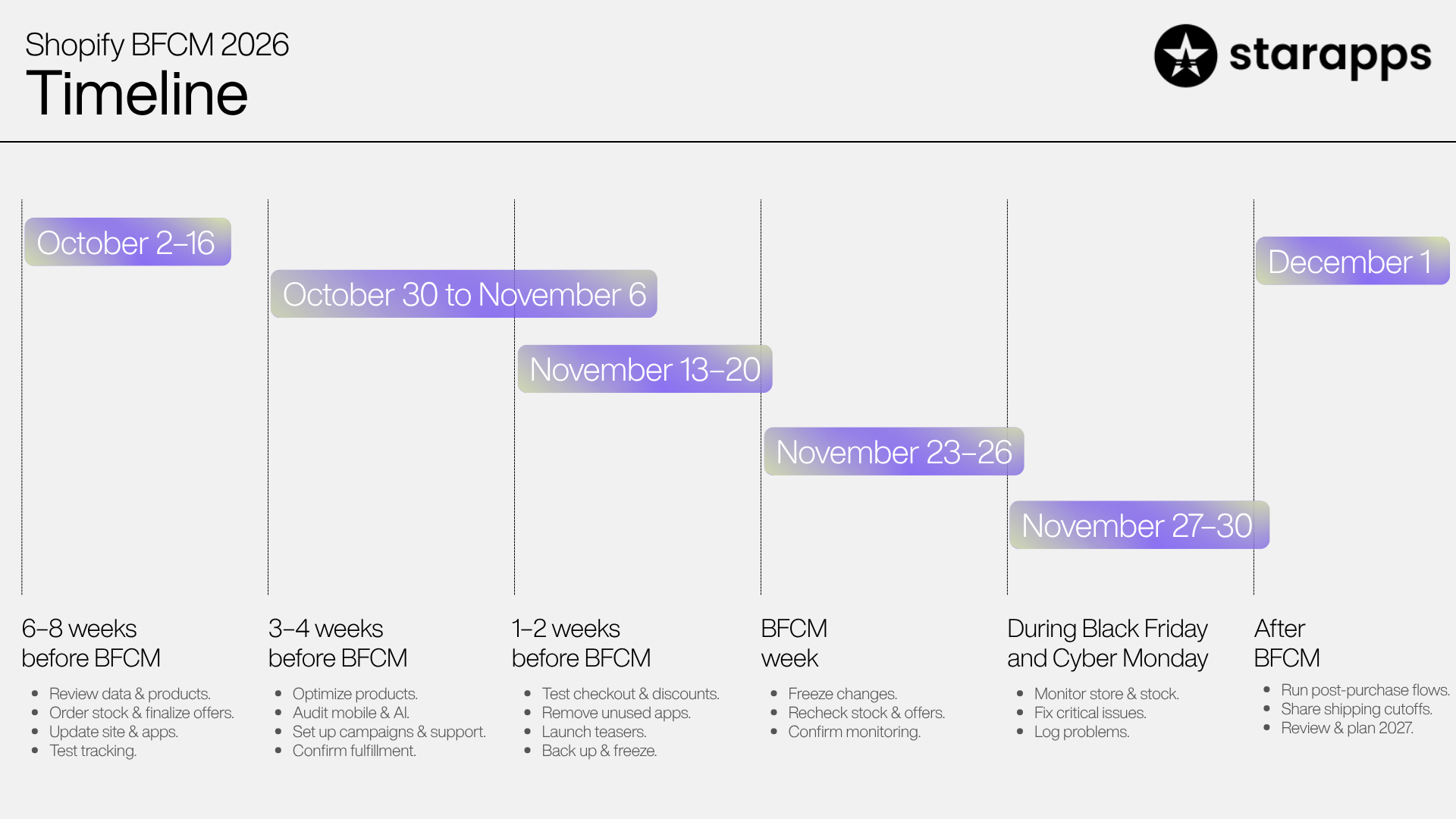
Start 6–8 weeks before Black Friday, which means early October 2026. Use the early weeks for work that needs development, supplier lead time, or search indexing. Use the final two weeks for testing, not building. If you import stock or run a large catalog, place inventory orders earlier than this timeline suggests.
If you plan to launch deals earlier in November, move every deadline below forward to match your launch date.
6–8 weeks before BFCM (roughly October 2–16)
These tasks take the longest or carry the most risk:
- Review last year's data: Pull your BFCM 2025 top products, top variants, conversion by device, revenue by channel, and support ticket themes.
- Audit your catalog and choose hero products (see the next section).
- Place inventory orders: Supplier and freight lead times are the one thing you can't compress in November.
- Decide your offer structure based on margins.
- Start development work: theme updates, swatch and variant setup, new sections, BFCM landing pages.
- Install and configure any new apps: Treat mid-October as your cutoff so every app gets tested on real devices.
- Plus stores: confirm that discount, shipping, and payment rules previously built on Shopify Scripts now run on Functions or apps.
- Audit tracking before you spend money on ads.
- Publish or refresh your BFCM landing page URL so search engines have time to crawl it.
3–4 weeks before BFCM (roughly October 30 to November 6)
- Update product pages for hero products: images, descriptions, shipping and returns information.
- Build BFCM collections, gift guides, and category landing pages.
- Run a mobile audit of your top 20 product pages.
- Review product attributes, prices, and policies for accuracy in AI channels.
- Build email and SMS flows: teaser, early access, launch, reminder, last chance.
- Update your FAQ and write support macros.
- Confirm shipping cutoffs, packaging supplies, and fulfillment capacity.
1–2 weeks before BFCM (roughly November 13–20)
- Create and schedule discounts, then test each one in a real cart.
- Place test orders across payment methods and devices.
- Remove unused apps and scripts, then retest page speed.
- Walk through the full purchase journey as a team.
- Launch teaser campaigns.
- Schedule support and fulfillment staff, and agree on who can make decisions during the sale.
- Duplicate your live theme as a backup and announce your change freeze date.
BFCM week (November 23–26)
- Start the change freeze (explained in the technical section below).
- Recheck stock for hero products and their best-selling variants.
- Confirm that scheduled discounts, emails, and ads use the correct start times and time zone.
- Launch early access if you're running it.
- Share the monitoring plan and escalation contacts.
During Black Friday and Cyber Monday (November 27–30)
- Monitor on a fixed rhythm (see the monitoring plan).
- Move sold-out products out of prominent positions quickly.
- Fix problems, but hold off on "improvements."
- Log every issue with its time and cause.
After BFCM (December 1 onward)
- Keep post-purchase and win-back flows running.
- Publish holiday shipping cutoffs clearly.
- Complete a performance review within two weeks.
- Turn the findings into a written plan for January and BFCM 2027.
Shopify BFCM Store Readiness Checklist
Before BFCM, check every stage a shopper touches: how they find products, how they evaluate and choose variants, how the cart and checkout behave, and how you'll support, protect, and measure the store.
Audit Your Product Catalog Before BFCM
A catalog audit tells you which products deserve BFCM attention, which can carry a discount, and which listings will cause problems under heavy traffic.
A messy catalog costs a little in a normal week. During BFCM, it costs much more: the wrong products get promoted, popular variants sell out unnoticed, and incomplete listings generate support tickets.
Why catalog cleanliness matters during BFCM
- Filters depend on consistent data. If one product says "Navy" and another says "Dark Blue," a color filter splits them.
- Search depends on shopper language. Titles and descriptions need the words people actually type.
- AI channels read the same data. Vague or inconsistent attributes carry through to AI shopping answers too.
A practical approach: export your products, sort by last year's BFCM revenue, and fully audit the top 20–50 first.
How to Optimize Shopify Product Pages for BFCM
A BFCM-ready product page removes uncertainty. Shoppers should instantly understand what the product is, what it costs now, which option to choose, when it will arrive, and what happens if it doesn't work out.
During BFCM, your page is being compared with competitors in other tabs. Every unanswered question is a reason to leave.
- Clear titles. Describe the product ("Merino Crew Sweater"), not only a style name ("The Harlow").
- Decision-first descriptions. Put material, fit, dimensions, compatibility, and care first, with storytelling below.
- Images for every variant, plus in-use and scale shots. On mobile, the first image does most of the work.
- Pricing that matches the cart. The sale and original prices on the product page must match what the cart shows.
- Visible offer mechanics. Say whether the discount is automatic or needs a code, and show the code near the price.
- Clearly labeled variants
- Variant-level availability. "Only 3 left in Medium" helps. "In stock" when Medium is gone does not.
- Shipping estimates near the add-to-cart button, especially as holiday cutoffs approach.
- Return policy, including any holiday extension.
- Reviews and trust signals that load quickly on mobile.
- Short FAQs on products that generate repeat questions.
- One dominant call to action that pop-ups don't cover.
Prepare Shopify Product Variants and Swatches for BFCM
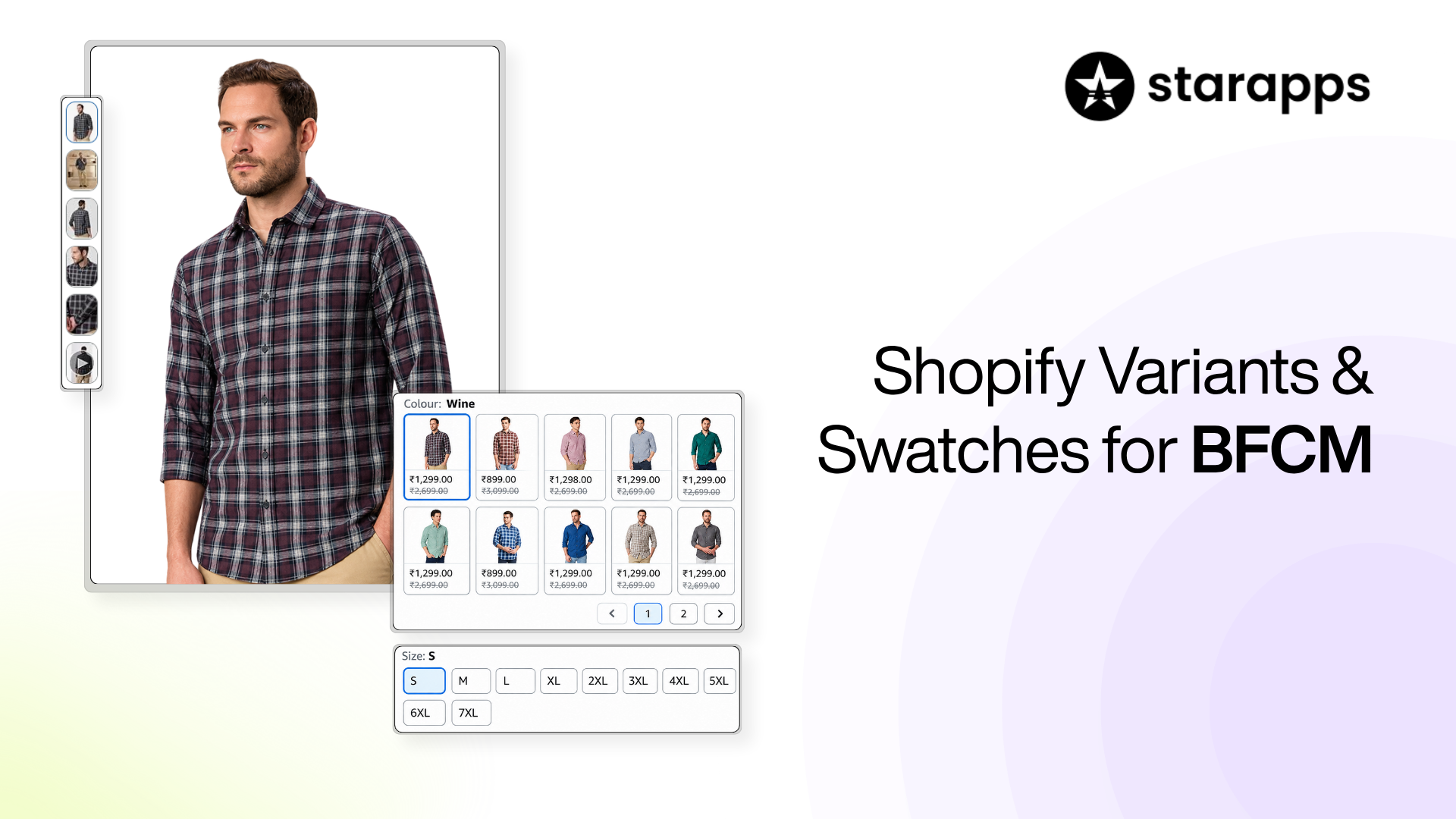
Shoppers decide fast during BFCM. If they can't instantly see which colors and sizes exist, what each option looks like, and whether it's in stock, many will leave for a store where the choice feels easier. Make variants visual, accurate, and easy to tap on mobile.
Variant selection is the moment a shopper moves from "I like this" to "I'm buying this one." It is also where many Shopify product pages quietly create friction.
What Shopify handles natively
Before adding any tools, check what Shopify and your theme already support (Shopify variants vs options explained):
- Limits: a product can have up to 2,048 variants and up to three options (Shopify Help Center).
- Swatches: Shopify supports native color swatches through category metafields, but your theme must support variant options with swatches (Shopify Help Center).
- Variant images: each variant can have only one assigned image. Shopify suggests grouping related images in the product gallery, and points to its Combined Listings app (Plus and enterprise plans only) when you need a specific set of images per option (Shopify Help Center; how combined listings work).
- High-variant products: Shopify notes that apps not using its supported GraphQL product APIs may break or degrade on products with more than 100 variants (Shopify developer changelog). Test your reviews, bundles, search, and subscription apps against those products before BFCM.
For a simple catalog, a swatch-ready theme with clean category metafields may be all you need.
Common variant problems and how to fix them
A 15-minute variant audit
- Open your top 10 multi-variant products on your phone.
- Tap every color. Do the images change to match?
- Select a sold-out size. Is that obvious before adding to cart?
- Open a collection page. Can shoppers see a product comes in several colors without clicking into it?
- Check that option names match across products, so filters group them correctly.
If most products fail one of these checks, variant presentation is one of the highest-value fixes you can make before BFCM, because it affects every shopper who reaches a product page.
When a Shopify app makes sense
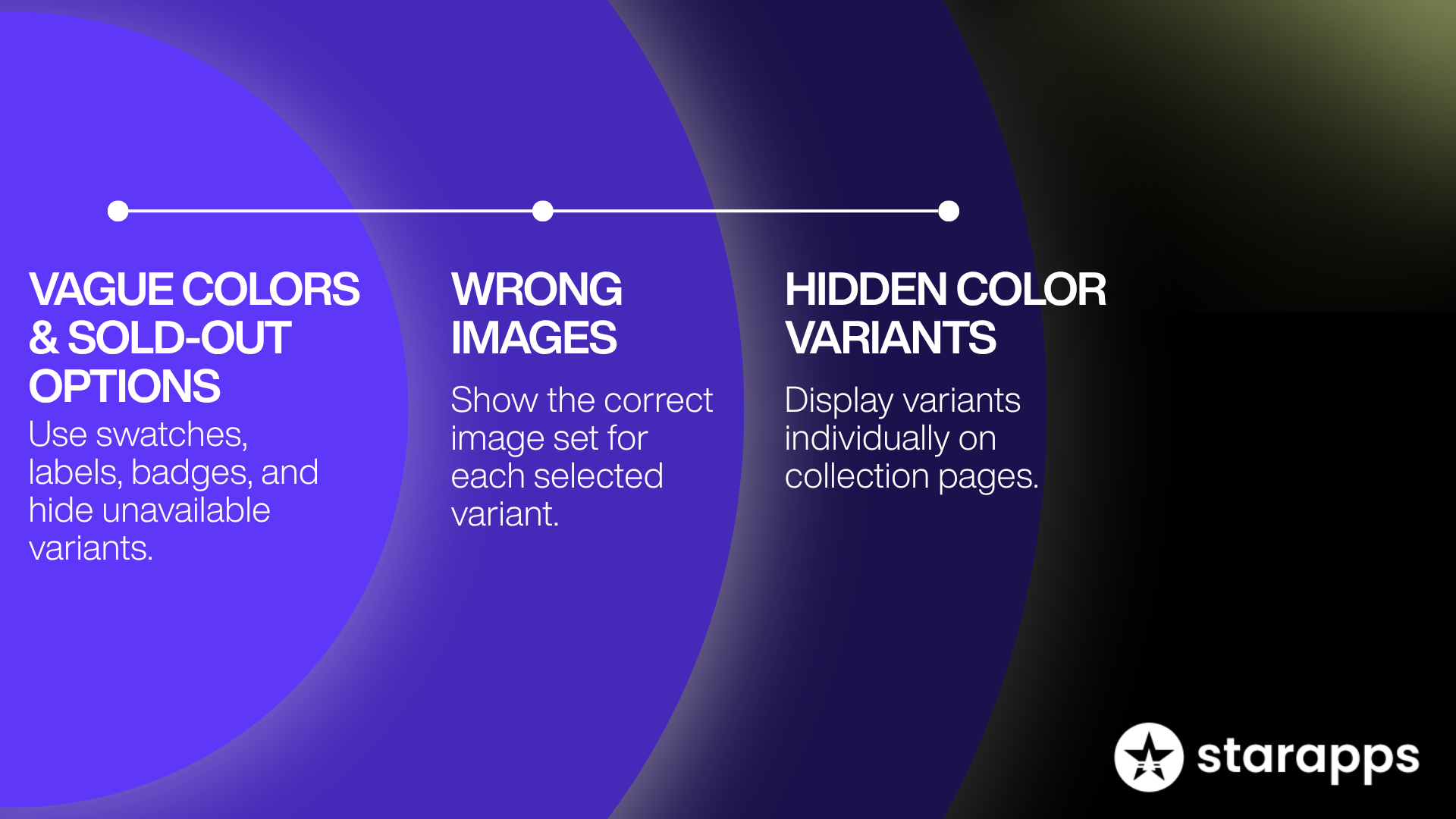
Apps become useful when your theme can't do what you need, or when fixing hundreds of products by hand isn't realistic before November. Each StarApps tool below maps to a problem in the table above:
- Dropdowns, vague color names, and sold-out options: Color Swatch King: Variants turns selectors into color swatches, image swatches, buttons, or dropdowns that can display price, labels, and badges. It also adds swatches to collection pages, supports bulk swatch upload by CSV, and can hide out-of-stock variants (Swatch King setup guide).
- Wrong or mixed images: SA Variant Image Automator shows multiple images for the selected variant, groups images without manual tagging, and keeps your theme's gallery layout (changing images based on variant selection).
- Colors invisible on collection pages, on non-Plus plans: SA Variants: Combined Listings shows variants individually on collection pages, each with its own title, images, URL, and description, while keeping them grouped for navigation.
App performance matters under BFCM load. Color Swatch King and SA Variant Image Automator both carry Shopify's Built for Shopify badge, which Shopify awards to apps that meet its highest standards for performance, design, and integration.
Whichever route you choose, finish setup in October so the changes can be tested on real devices.
Improve Product Discovery and Shopify Merchandising
Cut the steps between what a shopper wants and a relevant product. During BFCM, every extra tap or dead-end search is a chance for them to leave.
Build collections around BFCM intent.
- BFCM deals, sorted by in-stock best sellers
- Deals by category for larger catalogs
- Gift guides by recipient or price band
- Best sellers
- Bundles and sets
To keep a sale collection current automatically, create a smart collection with the condition "Compare-at price is not empty," an approach recommended in Shopify's BFCM checklist. Discounted products then enter and leave the collection on their own.
Sort collections deliberately, and move sold-out items down or out.
Tighten navigation
- Add a "Black Friday" link to the main menu and the mobile menu.
- Link the homepage hero straight to the deals collection.
- Keep the mobile menu short.
Set up search, filters, and recommendations.
Shopify's free Search & Discovery app handles synonym groups, product boosts, filters, product recommendations, and search analytics.
- Fix zero-result searches: The app reports search terms, including those that return nothing.
- Add synonyms for how shoppers describe products ("hoodie" and "sweatshirt").
- Boost BFCM hero products for common searches.
- Set up filters for size, color, price, and availability. Filters only appear if your theme supports Shopify storefront filtering.
- Set complementary recommendations on hero products to support bundles.
Make variants visible before the product page.
If a shopper wants a green jacket and your grid only shows black, they may never click. For color-driven categories, collection swatches or separate tiles per color help shoppers spot their option early (showing color variants on Shopify collection pages).
How to Prepare Your Shopify Store for Mobile Shoppers
Most holiday shopping happens on phones. Test your full purchase journey on a real mobile device and fix anything that slows a thumb-driven shopper down.
Adobe found that smartphones accounted for 56.4% of US online transactions in the 2025 holiday season, rising to 61.6% on Thanksgiving Day (Adobe). Check "Sessions by device type" in Shopify Analytics for your own split.
Test on a mid-range phone over a normal mobile connection, not only a flagship device on office Wi-Fi.
Test Shopify Store Performance, Security and Technical Readiness
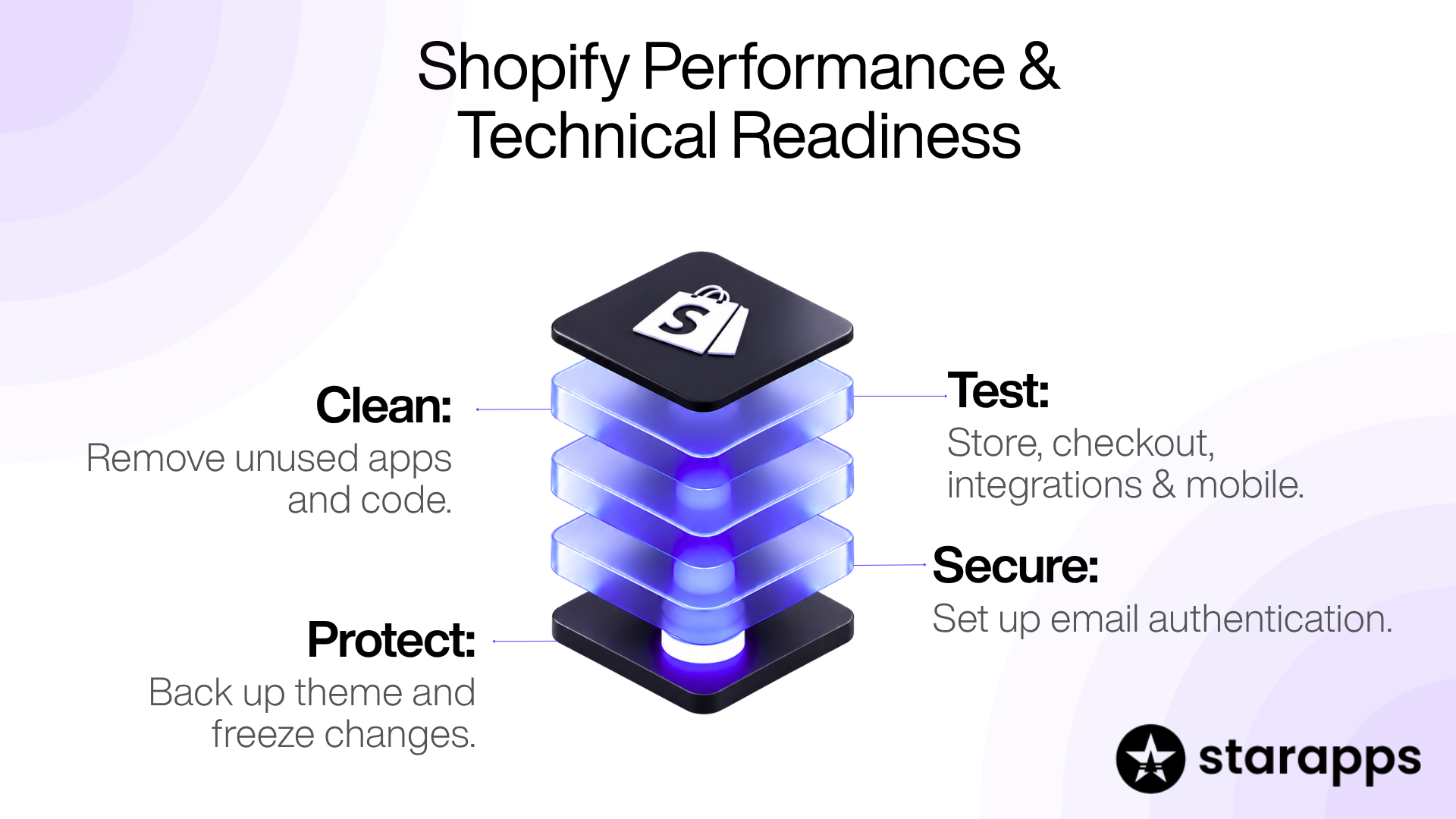
Test the real purchase journey (collection, product, variant selection, cart, checkout) rather than just your homepage; remove anything that slows it down, and lock down changes before the sale.
Shopify runs the hosting and checkout infrastructure, so most of the performance risk you control sits in your theme, apps, and third-party scripts.
What to test
- Homepage, top collections and top product pages
- Products with many variants and images
- Collections with filters applied
- Search and predictive search
- Cart updates and cart drawers
- Checkout, payments, discounts and shipping calculations
- Reviews, loyalty, ERP and 3PL integrations
- Broken links in navigation, emails and ads
- Your 404 page (link it to deals and search)
- Mobile performance on real devices
Clean up apps and scripts
- List every installed app and what it does.
- Remove anything you no longer use.
- Check the theme for leftover app code with your developer or the app's support team.
- Retest speed on your top product pages.
Check security and email authentication.
- Shopify issues SSL certificates automatically for stores and custom domains.
- Set up DMARC, SPF, and DKIM records so mail providers can confirm your campaign emails are genuine.
- Decide how you'll review risky orders. Shopify Flow is free on the Basic, Grow, and Advanced plans and can automate tasks such as flagging or holding high-risk orders.
Back up your theme and set a change freeze
- Duplicate your live theme before BFCM week, so you have a known-good version to roll back to.
- Start a change freeze at the beginning of BFCM week. Nobody edits the theme, installs apps, or changes pricing rules unless something is broken. If a problem appears during the sale, you'll know it wasn't caused by a change someone made that morning.
How to Plan BFCM Discounts and Offers on Shopify
The best BFCM offer is one your margins can support, your shoppers understand instantly, and your checkout applies without errors. That is not automatically the biggest discount.
How Shopify discounts behave
- Combinations: automatic discounts and codes can apply to the same cart only when each is set to combine with the other's discount class (combining discounts).
- Common errors: when a shopper sees a "couldn't be used with your existing discounts" message, Shopify's troubleshooting points to combination settings, a conflicting automatic discount, checkout-modifying apps, or discount types with extra limits such as Buy X get Y.
- Sales channels: discount codes can be redeemed on every sales channel you've set up, and automatic discounts apply on all channels. For POS, automatic discounts work only at POS Pro locations (discount codes FAQ). If you sell in person or on other channels, check that each offer makes sense everywhere it applies.
- Plus stores: custom discount logic that used to run on Scripts must now run on Functions or an app. Test it as carefully as a brand-new discount.
- Scheduling on Plus: Shopify's Launchpad app can schedule and coordinate sales, product drops, and restocks (apps made by Shopify).
Why complicated promotions backfire
Complex offers make shoppers hesitate, fail at checkout, create support tickets, and stack margin loss you didn't plan for. If you can't explain the offer in one sentence on a banner, simplify it.
Test every offer before launch.
- The offer on its own
- Combined with every other active discount
- On sale items, bundles, and gift cards, if relevant
- Just above and just below any minimum threshold
- Start and end times in your store's time zone
Prepare Inventory and Fulfillment for BFCM
Forecast demand by variant, secure stock for best sellers early, confirm fulfillment capacity, make shipping promises you can keep, and decide in advance what happens when something sells out.
Forecast by variant, not just by product
A product can show plenty of total stock while its most popular size or color is nearly gone. That variant sells out first, and the page suddenly offers only the options nobody wants.
For each hero product:
- Pull last BFCM's sales by variant.
- Compare that mix with current stock by variant.
- Reorder the short variants.
Then adjust for growth, ad spend, list size, new products, and offer depth. Aim for a reasonable range rather than a perfect number.
Confirm supplier and fulfillment capacity
- Confirm lead times, including freight and customs.
- Agree emergency reorder options for top products.
- Confirm daily pick, pack, and ship capacity with your team or 3PL.
- Plan extra staff for the days after BFCM.
- Stock packaging supplies.
Automate stock alerts
Shopify Flow can automate inventory tasks such as sending low-stock alerts or hiding products that sell out. Shopify also lets you hide out-of-stock products so customers can't order items you can't fulfill.
Make shipping promises you can keep
- Show realistic delivery estimates on product pages and in confirmation emails.
- Publish holiday shipping cutoffs early.
- US sellers: if you state a shipping time, you need a reasonable basis for it. If you don't state one, the FTC's Mail, Internet, or Telephone Order Merchandise Rule requires shipment within 30 days unless you notify the customer of a delay and get their consent.
Plan for sell-outs
Decide before the sale:
- Will sold-out variants be hidden, marked unavailable, or offered with "notify me"?
- Will you accept preorders or backorders? If so, the product page must state the expected ship date.
- Which substitute products will you promote if a hero product sells out?
How to Test Your Shopify Checkout Before BFCM
Place real test orders across devices, payment methods, discounts, and shipping destinations. Small checkout issues that go unnoticed in a quiet week can cost many orders at BFCM volume.
Shopify recommends test orders to confirm that checkout, order processing, inventory, shipping, email notifications, and taxes are set up correctly. You can simulate payments with the Test payment gateway or Shopify Payments test mode (placing a test order).
Two warnings from Shopify's documentation:
- While payment providers are in test mode, customers can't place live credit card orders. Switch test mode off as soon as you finish (payment gateway test mode).
- Don't fulfill test orders, because shipping labels are charged. Turn off auto-fulfillment apps before testing (testing Shopify Payments).
Give accelerated checkout its own test: Shop Pay was used for 32% of orders during BFCM 2025. If you sell internationally, test currencies, duties, and shipping for your top countries, since cross-border orders made up 16% of all orders that weekend (Shopify).
Prepare Customer Support, Returns and Store Policies
Answer the predictable questions before shoppers ask them. Update policies, prepare replies, and set up self-service answers so support volume doesn't slow sales or fulfillment.
Before BFCM
- Update your FAQ with sale terms, shipping windows, cutoffs, and return rules.
- Write macros for the most likely questions: order status, a discount not applying, delivery delays, damaged items, size exchanges.
- Set up chat self-service. Shopify Inbox supports instant answers for common questions, including a built-in "Track my order" answer, and shows staff what a customer has in their cart.
- Test your contact form so submissions reach the right inbox.
- Schedule coverage for BFCM weekend and the week after, when delivery questions peak.
Returns
Decide whether you'll extend holiday returns, then make the policy easy to find. Shopify recommends displaying it on the returns policy page, the FAQ page, product pages, and order notification emails.
Prepare SEO and AI Shopping Visibility Before BFCM
BFCM SEO works best when it builds on pages that already exist and rank. A new strategy started in November rarely pays off before the sale ends. In 2026, the same product data also feeds AI shopping channels, so accuracy matters in two places at once.
Use an evergreen BFCM URL
Keep one permanent URL, such as /collections/black-friday, and refresh its content every year instead of creating a new /black-friday-2026 page. After the sale, don't delete it. Update it with next year's message and link to current best sellers.
Optimize product and collection pages
- Match search intent in titles and descriptions ("women's waterproof hiking boots," not only "Trail Boot 2").
- Write metadata for BFCM collections and hero products.
- Use structured content: headings, specification lists, and FAQs.
- Write accurate alt text for variant images ("green merino crew sweater, front view").
- Check indexability. Make sure BFCM collections aren't hidden, password-protected, or set to noindex.
- Link internally from the navigation, homepage, category pages, and gift guides.
Get ready for AI shopping channels
AI assistants are now a meaningful referral source, with generative AI traffic to US retail sites up 693.4% year over year in the 2025 holiday season (Adobe).
On Shopify, this goes beyond SEO. Agentic storefronts make eligible products discoverable and purchasable in AI channels, managed from Sales channels > Agentic in your Shopify admin.
Before BFCM:
- Open that settings page and confirm which AI channels you want active.
- Make sure product attributes (material, size, color, compatibility), prices, availability, and store policies are complete and accurate. AI channels rely on this data to answer shopper questions.
- Use the same consistent option names you cleaned up for filters. Clean variant data helps shoppers, filters and AI systems at the same time.
Prepare Email, SMS, Social and Paid Campaigns
Campaigns bring shoppers in, but results depend on where they land. Build campaigns and landing pages together so every message leads to a page that delivers exactly what was promised.
Campaign sequence
- Teaser (1–2 weeks before): dates and early-access sign-up
- Early access (BFCM week): subscribers and VIPs
- Launch (Black Friday): clear offer with a direct link to the right collection
- Reminder (weekend): best sellers, low-stock items, gifts
- Cyber Monday: a new angle or a final push
- Last chance: a clear end time
- Post-purchase and win-back (December onward)
Segments to prepare
- VIP and repeat customers
- Recent first-time buyers
- Subscribers who have never purchased
- Past BFCM buyers
- Shoppers who browsed specific categories
Automated flows to check
- Abandoned checkout: Shopify can send automatic recovery emails through its Messaging automations. Confirm your triggers, the links work, and the messaging reflects your BFCM offer.
- Browse abandonment that points to the exact product and variant viewed.
- Welcome flow that mentions BFCM for new subscribers.
- Post-purchase flow with shipping expectations, cross-sells, and review requests.
Social and paid
- Send each ad to a specific page (deals collection, product, gift guide), not the homepage.
- Keep UTM parameters consistent so channels can be compared afterward.
- Prepare retargeting audiences for product viewers and cart abandoners.
- Plan creative refreshes across a longer sale window.
Social is growing as a BFCM channel: Adobe data showed social media drove 3.6% of US retail sites' Cyber Monday 2025 revenue, up 56.5% year over year (Digital Commerce 360).
Set Up Shopify Analytics and Tracking Before BFCM
Confirm tracking is accurate, record baselines from normal weeks, and decide in advance what you'll do if a key number moves.
Shopify Analytics is available on every plan, with a customizable dashboard of metrics such as net sales by channel and sessions by device type.
Turn data into decisions
- Record baselines from the four weeks before BFCM.
- Set thresholds. For example: "If add-to-cart rate falls well below baseline for an hour, check the top product pages."
- Assign owners for each metric, and agree who is allowed to make changes.
What to Analyze After BFCM
Review what sold, where shoppers got stuck, and which customers you acquired, then turn those findings into your merchandising and campaign plan for the next 12 months.
Turn the review into action
- Merchandising: build January collections around your top BFCM variants.
- Product pages: fix whatever drove returns, such as unclear sizing or color images that don't match the product.
- Search: add synonyms and products for zero-result terms.
- Retention: run win-back flows for first-time BFCM buyers, who often need a reason to return at full price.
- Next year: write a one-page "BFCM 2027 starts here" note covering what worked, what broke, and what to start earlier.
Starting Late? What to Prioritize
If you're reading this in November, skip the nice-to-haves and protect revenue first.
Four weeks left
- Secure stock for your top products' best-selling variants.
- Fix variant images and swatches on your top 20 product pages.
- Build one BFCM collection and link it from navigation.
- Set up your offer and test it.
Two weeks left
- Place test orders on mobile with every payment method.
- Remove unused apps and pop-ups.
- Update your FAQ and write support macros.
- Confirm shipping cutoffs.
One week left
- Duplicate your theme and start the change freeze.
- Recheck variant-level stock.
- Confirm discount and email schedules.
- Agree who monitors what during the sale.
Avoid starting a theme redesign, a platform migration, or a batch of new app installs in the final two weeks. The risk usually outweighs the benefit.
Frequently Asked Questions
When should I start preparing my Shopify store for BFCM 2026?
Start in early October 2026, about 6–8 weeks before Black Friday on November 27. Place inventory orders earlier if you import stock. Finish development and new app installs by early November, and use the final two weeks for testing.
What changed on Shopify for BFCM 2026?
Three changes matter most. Products can now have up to 2,048 variants. Shopify Scripts stopped running on June 30, 2026, so Plus stores need that logic on Functions or apps. And agentic storefronts can surface eligible products in AI channels such as ChatGPT, Gemini, and Copilot.
What should I check before BFCM?
Check product pages, variants, collections, search, the mobile experience, page speed, discounts, checkout, payments, shipping rates, variant-level inventory, support readiness, and tracking. Test the whole purchase journey rather than individual pages.
How do I prepare Shopify product variants for BFCM?
Use visual swatches for color and buttons for size. Show images that match the selected variant, and clearly mark or hide sold-out options. Order options logically, keep option names consistent across products, test selectors on a phone, and check stock by variant.
How can I optimize Shopify product pages for BFCM?
Make sale pricing match the cart, show images for every variant, and display variant-level availability. Place shipping estimates and your return policy near the add-to-cart button, and keep one clear call to action that pop-ups don't cover.
Should I install new Shopify apps right before BFCM?
Avoid it. Install and test new apps by mid-October, and freeze app changes during BFCM week. Every new app adds code and risk to pages that are about to carry peak traffic.
How long should a BFCM sale run?
It depends on your margins, stock, and audience. Shopify's own checklist suggests announcing offers before the weekend and extending them into December if inventory and margins allow. Plan stock and staffing for the full period you promote.
What should I monitor during BFCM?
Monitor site availability, checkout errors, payments, and traffic continuously. Check stock, discount performance, and conversion every hour or two. Review campaigns and fulfillment a few times a day.
What should I analyze after BFCM?
Review best-selling products and variants, conversion by device, revenue by channel, discount performance, new customers, zero-result searches, support tickets, and returns. Use the findings to plan January merchandising and BFCM 2027.
Heading

End-to-end traceability
To ensure regulatory compliance, you must have a complete overview of your products from production to shipping. Book a demo to see how Katana can give you full visibility of your operations.
.png)

.svg)

.svg)

.svg)
.png)