
SA Variants (Variant King) Pro Plan: Shopify Combined Listings Features, AI and Pricing
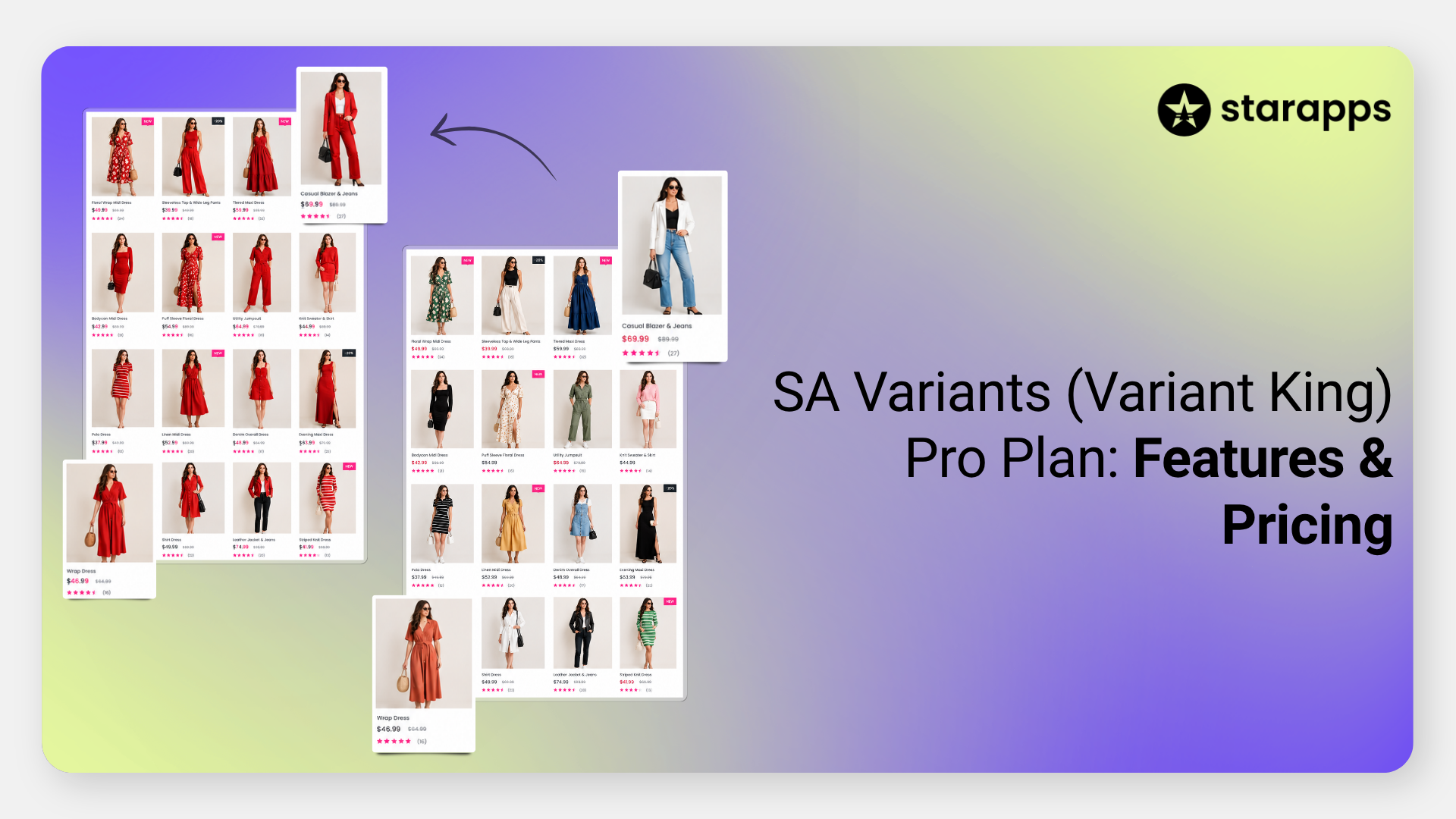

Compare SA Variants Standard vs Pro: AI catalog monitoring, Swatch PowerUps, group categories, and higher limits. Works on every Shopify plan. Try free for 30 days.
Key Takeaways
- The SA Variants (Variant King) Pro plan includes every Standard feature plus AI catalog monitoring, Swatch PowerUps, group categories, and higher limits.
- Pro starts at $10 a month on Pause & Build and goes up to 199.90 on Plus (29.90 on Basic), after a 30-day free trial.
- Pro raises limits from 5,000 to 25,000 product groups and from 20 to 500 split products per month.
- Both plans include AI group and swatch generation; Pro adds AI option naming and monitoring for missing products, mis-grouped products, duplicate groups, and new products.
- Other Pro-only tools include tag-based grouping, separate mobile and desktop swatch designs, custom integrations, and priority support.
- Swatch PowerUps show price, compare-at price, unit price, ratings, badges, and low-stock alerts directly on swatches.
- Unlike Shopify's native Combined Listings app, which requires Plus, SA Variants works on every Shopify plan with an online store, including Basic.
Sell a jacket in eight colors on Shopify, and you face an awkward choice. Add the colors as variants, and all eight share one URL, one title, and one set of SEO fields. Make each color its own product, and a shopper who lands on the black jacket has no easy way to find the other seven.
We built SA Variants: Combined Listings (Variant King in its App Store URL) to remove that choice. Each color gets its own product page, and swatches tie the pages back together as one product. The Pro plan raises the limits to 25,000 groups and 500 splits a month, puts price and stock on the swatches, and adds AI that flags grouping mistakes as your catalog changes.
What Does SA Variants: Combined Listings Do?
SA Variants works in both directions, on both paid plans:
- Split variants: converts each variant of one product into its own product, with its own page, URL, title, description, images, and SEO fields.
- Product groups: links separate products into one combined listing. Shoppers switch between them with color swatches, buttons, or dropdowns on product pages, and collection pages show each color variant instead of a single product card.
Still weighing variants against separate products? Our guide to combining Shopify products into variants covers the trade-offs.
Because each variant is a real product, store search and filters can return the exact variant a shopper wants. A search for "red jacket" returns red jackets, not every jacket that happens to come in red. Search engines can also index each variant page on its own.
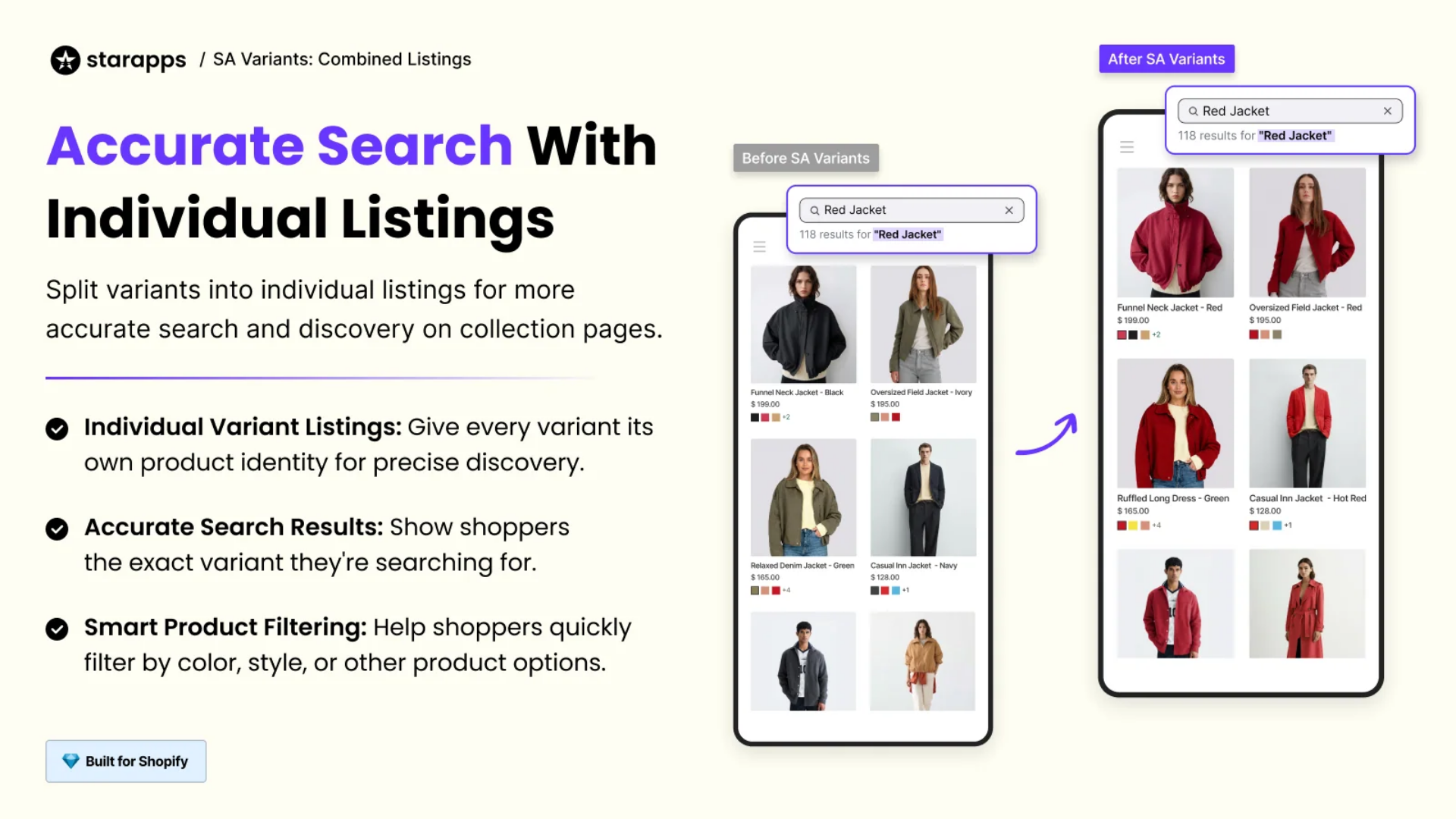
Shopify's own Combined Listings app runs only on Plus and enterprise plans, and it caps each listing at 60 products and 2,048 variants.SA Variants works on every Shopify plan with an online store, including Basic, Grow, and Advanced, and carries the Built for Shopify badge. It works with Shopify Admin, collection pages, Shopify Combined Listings, page builder apps, product filter and search apps, and our Variant Image Automator app.
SA Variants Standard vs Pro: Feature Comparison
Pro includes every Standard feature and adds higher limits, Pro-only AI monitoring, Swatch PowerUps, and extra merchandising controls. It costs about twice as much as Standard on each Shopify plan.
How much does SA Variants Pro cost?
SA Variants Pro starts at $10 a month on Shopify's Pause & Build plan and goes up to 199.90 on Plus ($ 29.90 on Basic). Pricing follows your Shopify plan, not your catalog size:
- Both paid plans include a 30-day free trial and no setup fees.
- We bill in USD every 30 days.
- The app price drops automatically if you move to a smaller Shopify plan.
- The free plan covers Shopify Partner stores only.
- We offer multi-store and multi-app bundle pricing on request.
What AI Features Are in the SA Variants Pro Plan?
Pro has the two AI tools that come with Standard (group generation and color swatch generation), plus six Pro-only AI features. Most of them watch your existing groups and flag problems as your catalog changes.
AI tools on both plans
- AI group generation: proposes product groups from your existing catalog.
- AI color swatch generation: creates color swatches for option values. You can also upload swatches in bulk through CSV.
- Automation on both plans: product status monitoring adds products to a group or removes them automatically as you publish, archive, draft, or delete them.
On either plan, you can also build groups by hand in the app dashboard or in bulk through CSV. You can also create them with Shopify Sidekick, Shopify's built-in AI assistant.
Pro-only AI features
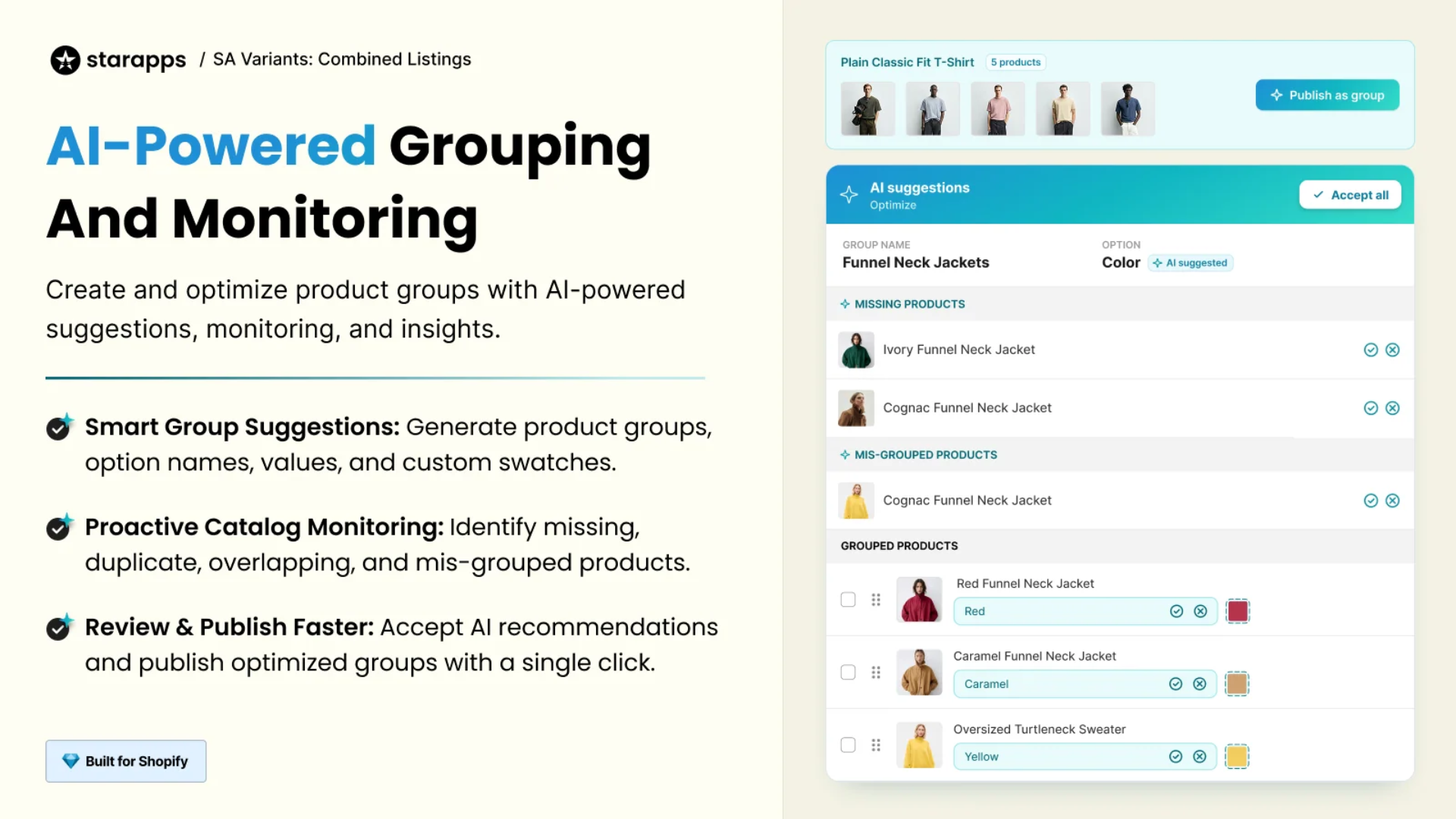
- AI option and value naming: suggests the shared option (such as Color) and value names (such as Caramel or Red) for a group.
- Missing-product suggestions: flags products that belong in a group but are not in it yet.
- Mis-grouped product alerts: flags products placed in the wrong group.
- Duplicate group detection: finds groups that duplicate each other.
- New-product monitoring: watches for new products and suggests groups for them automatically as your catalog grows.
- Theme compatibility monitoring (beta): watches for a newly published theme and confirms the app still works on it.
In this example, the AI flags two missing products and one mis-grouped product in a Funnel Neck Jackets group. You review the recommendations, accept them, and publish the corrected group with one click.
If you add products every week, run seasonal drops, or manage thousands of groups, nobody has time to check each group individually. These alerts point you to the groups that need fixing.
Group Categories: Organize Large Swatch Lists (Pro)
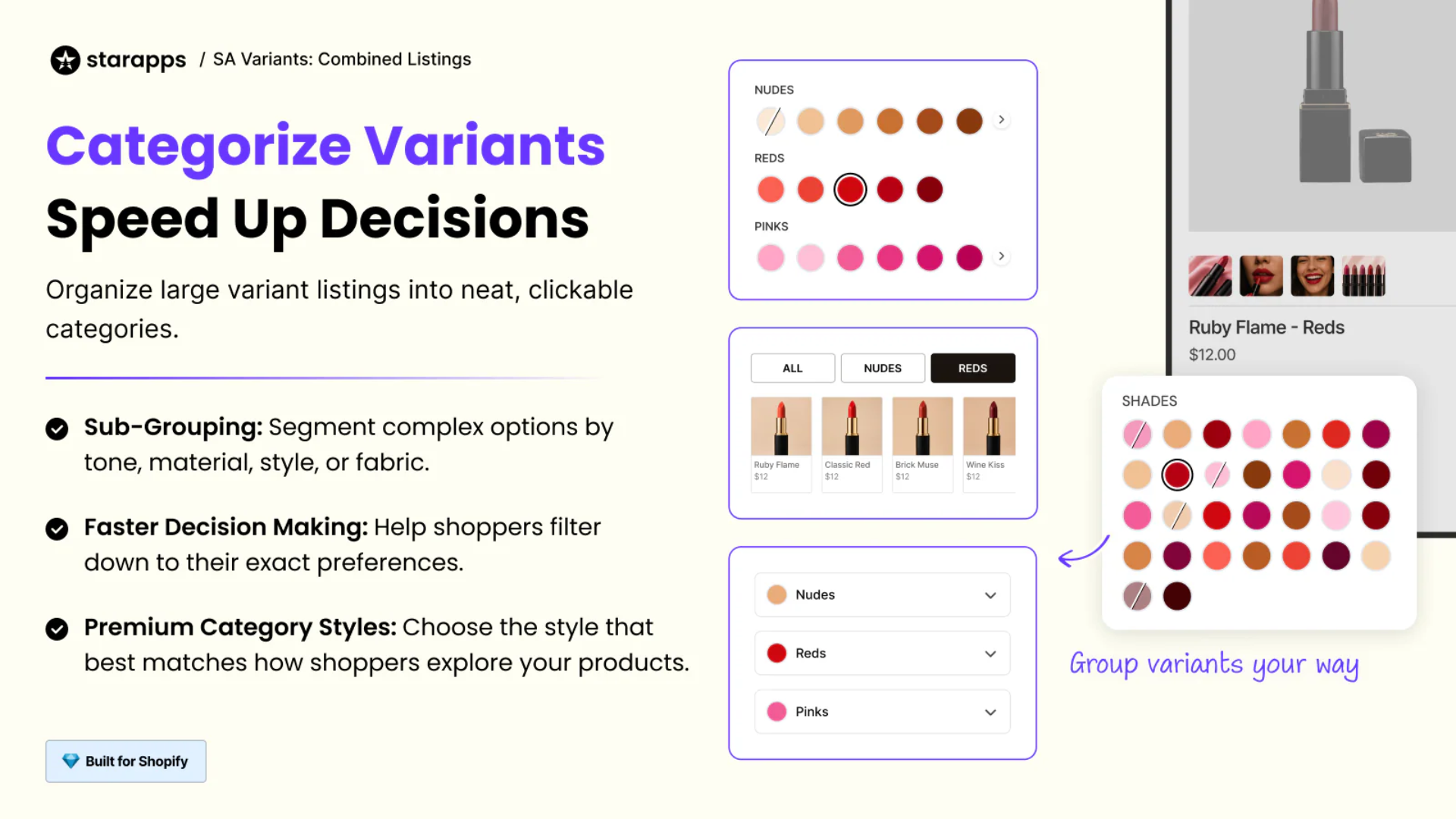
A lipstick with 30 shades shown as one grid is hard to choose from. Group categorization, a Pro feature, breaks a long swatch list into labeled sub-groups, so shoppers pick a family first and then a shade.
- How it works: you sort a group's variants into categories by tone, material, style, or fabric. For example, you can split the 30 shades into three categories: Nudes, Reds, and Pinks.
- Display styles: Pro includes premium category styles, so you choose how categories appear. Choose from three layouts: labeled swatch rows, tabs above product cards, and collapsible dropdowns.
- Best for: beauty shades, paint colors, fabrics and finishes, or any group with many options that fall into natural families.
Swatch PowerUps: Prices, Badges, Ratings and Stock on Swatches (Pro)
Swatch PowerUps put buying details on the swatch itself, so shoppers can compare variants without opening each one.
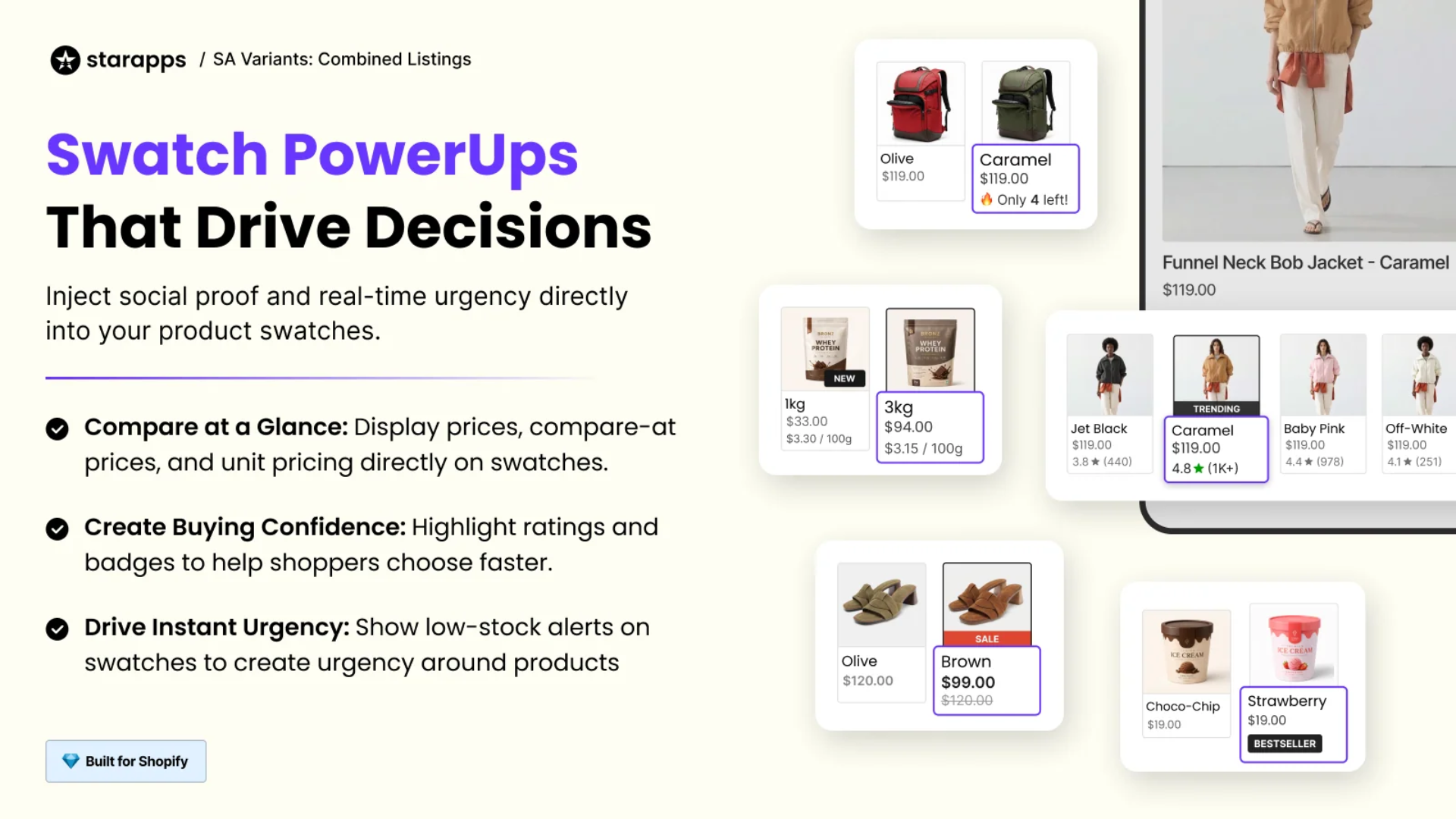
- Prices: price, compare-at price, and unit price. A protein pack, for example, can show 1 kg at $33.00 ($3.30 per 100 g) next to 3 kg at $94.00 ($3.15 per 100 g).
- Ratings and badges: a star rating and review count for each variant, plus badges such as New, Sale, or Sold-out. Custom badges are coming soon.
- Low-stock alerts: messages such as "Only 4 left" on variants with limited stock.
If your sizes, packs, or colors differ in price, discount, stock, or rating, PowerUps show that difference before anyone clicks.
Separate Mobile and Desktop Swatches (Pro)
Pro's device-optimized design lets you set different swatch designs for mobile and desktop. A layout that suits a wide desktop screen, such as a long row of image swatches, can crowd a phone screen. With separate settings, each device gets a layout that fits its screen.
Tag-Based Grouping (Pro)
Pro can also build product groups from Shopify product tags, which Standard can't. You tag the products that belong together, such as every colorway of one jacket, and the shared tag defines the group. If your tags already come from a PIM, ERP, or import process, you can reuse them instead of rebuilding the same logic in a CSV.
Pro Limits, Markets, Integrations and Support
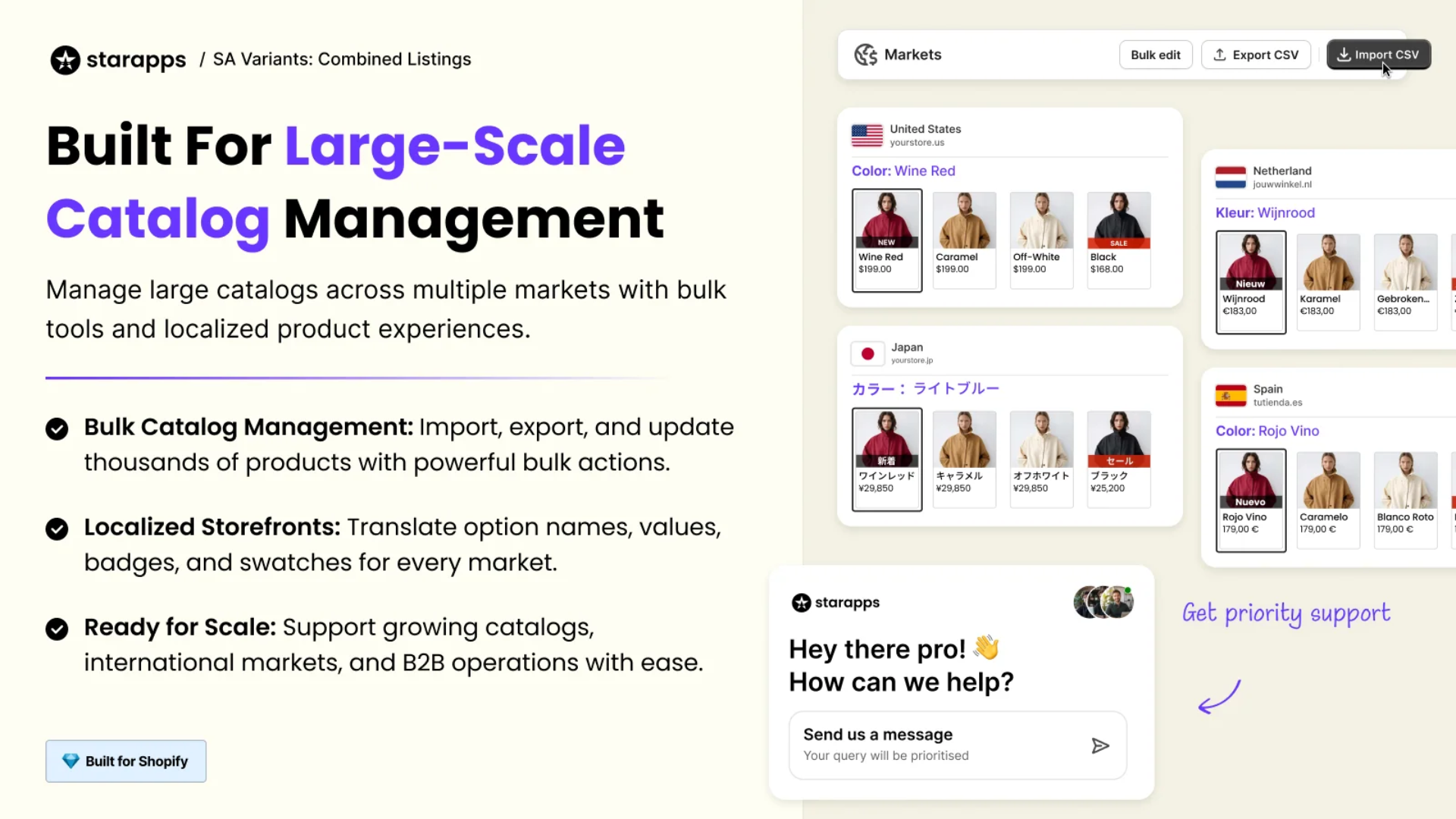
Pro allows five times as many product groups and 25 times as many split products per month as Standard, and adds custom integrations and priority support.
- Limits: up to 25,000 product groups (Standard: 5,000) and 500 split products per month (Standard: 20). Shopify allows up to 2,048 variants per product, and once a store passes 50,000 variants, it can add only 1,000 new ones a day through apps or CSV imports (Shopify Plus stores are exempt). Our guide to Shopify's variant limits explains when splitting variant-heavy products helps.
- Bulk CSV (both plans): create or update groups and upload swatches in bulk.
- Shopify Markets (both plans): translations, currency, and market-level product visibility. One color can read "Wine Red" in the US, "Wijnrood" in the Netherlands, and "Rojo Vino" in Spain.
- B2B (both plans): Standard and Pro both support B2B.
- Custom integrations (Pro): Pro exposes group data through a metafield, so any developer or app (mobile apps, headless storefronts, custom shopping experiences) can read it and build on it.
- Support (Pro): priority support and assisted onboarding, compared with live chat and onboarding help on Standard. Pro customers on an annual plan also get merchandising strategy support.
When Should You Choose Pro Over Standard?
Choose Pro if one or more of these apply:
- You need more than 5,000 product groups or more than 20 split products a month.
- Your catalog changes often, and you want AI to catch missing products, mis-grouped products, duplicate groups, and new products.
- Some groups have so many options that shoppers need categories.
- Price, discount, stock, or ratings differ by variant, and you want them visible on swatches.
- Your product tags already define which items belong together, or you need custom integrations.
Standard covers splitting, CSV and AI group creation, AI swatch generation, B2B and Markets support, which suits smaller or stable catalogs. Both plans include a 30-day free trial, so you can test Pro features on your own theme before billing starts.
Before you split variants
Splitting is a catalog change, not a display setting. Each split variant becomes a new product with a new URL. If you archive or hide the original product, redirect its old URL to the new pages so existing traffic and backlinks still land somewhere useful.
Frequently Asked Questions
Is Variant King the same app as SA Variants?
Yes. SA Variants: Combined Listings by StarApps uses the Variant King name in its Shopify App Store URL and on its pricing page.
What is the difference between splitting variants and grouping products?
Splitting takes one product with several variants and turns each variant into its own product. Grouping works the other way: it links products that already exist as separate listings, so shoppers see them as one product with swatches. SA Variants does both on Standard and Pro.
Do I need Shopify Plus to use combined listings?
No. Shopify's native Combined Listings app runs only on Plus and enterprise plans. SA Variants: Combined Listings works on every Shopify plan with an online store, including Basic, Grow, and Advanced. Our guide to how Shopify combined listings work compares the two approaches.
How many products can I split per month with SA Variants?
Standard allows 20 split products per month, and Pro allows 500. Product group limits are separate: 5,000 on Standard and 25,000 on Pro.
Is there a free trial or free plan?
Both paid plans come with a 30-day free trial and no setup fees. The free plan is only for Shopify Partner stores, such as development stores.
Does the price change if I change my Shopify plan?
Yes. The price follows your Shopify plan, so moving to a smaller plan lowers your monthly fee automatically. On Shopify's Pause & Build plan, Pro costs $10 a month.
Can I use SA Variants on more than one store?
Yes. We bill each store separately, but we set up multi-store pricing on request and offer a bundle discount if you use more than one StarApps app.
Does SA Variants support Shopify Markets and B2B?
Yes, on both plans. You get market translations, market currency, and market-level product visibility, plus B2B support. SA Variants translates group and swatch content into each market's language.
Will SA Variants work with my Shopify theme?
SA Variants works with page builder apps, collection pages, and product filter and search apps. On Pro, theme compatibility monitoring (in beta) watches for a newly published theme and confirms the app still works on it. Use the 30-day free trial to test SA Variants on your own theme before billing starts.
Will splitting variants change my product URLs?
Yes. Splitting is a catalog change, not a display setting: each split variant becomes a new product with its own URL. If you archive or hide the original product, create a URL redirect in Shopify from its old address to the new product pages, so existing traffic and backlinks still reach a live page.
Heading

End-to-end traceability
To ensure regulatory compliance, you must have a complete overview of your products from production to shipping. Book a demo to see how Katana can give you full visibility of your operations.

.png)

.svg)

.svg)

.svg)
.png)